Vidiyo
How to Go Live and Run a 24/7 Channel
How to go live and run a channel: combine live flagships with replay loops, honest EPG titles, and ops checklists for a reliable 24/7 FAST schedule.
How to go live and run a channel is a two-layer job: ship appointment lives, then fill the other hours with honest replays. 24/7 does not mean 24 hours of unique live every day.
Creators often think they must stream around the clock. That path ends in burnout and black screens. A durable model is live tentpoles plus catalog playout. This guide covers the operating system. Craft detail sits in live streaming best practices. Grid design deepens in channel scheduling for 24/7.
The live-plus-loop architecture
Layer 1: Live flagships
Fixed nights, fixed length, recorded cleanly.
Layer 2: Same-week replays
Prime and fringe windows that re-air the flagship with clear "Replay" labeling when useful.
Layer 3: Catalog filler
Evergreen episodes, compilations, and public-domain or owned library packs that keep the stream alive overnight.
Layer 4: Safety loop
A short, rights-clean package that can play if something fails. Better a known loop than silence.
Vidiyo supports live with chat plus linear scheduling and SSAI on a free FAST channel, which is the stack this architecture assumes. See Vidiyo for live streamers.
Studio go-live (web and phone)
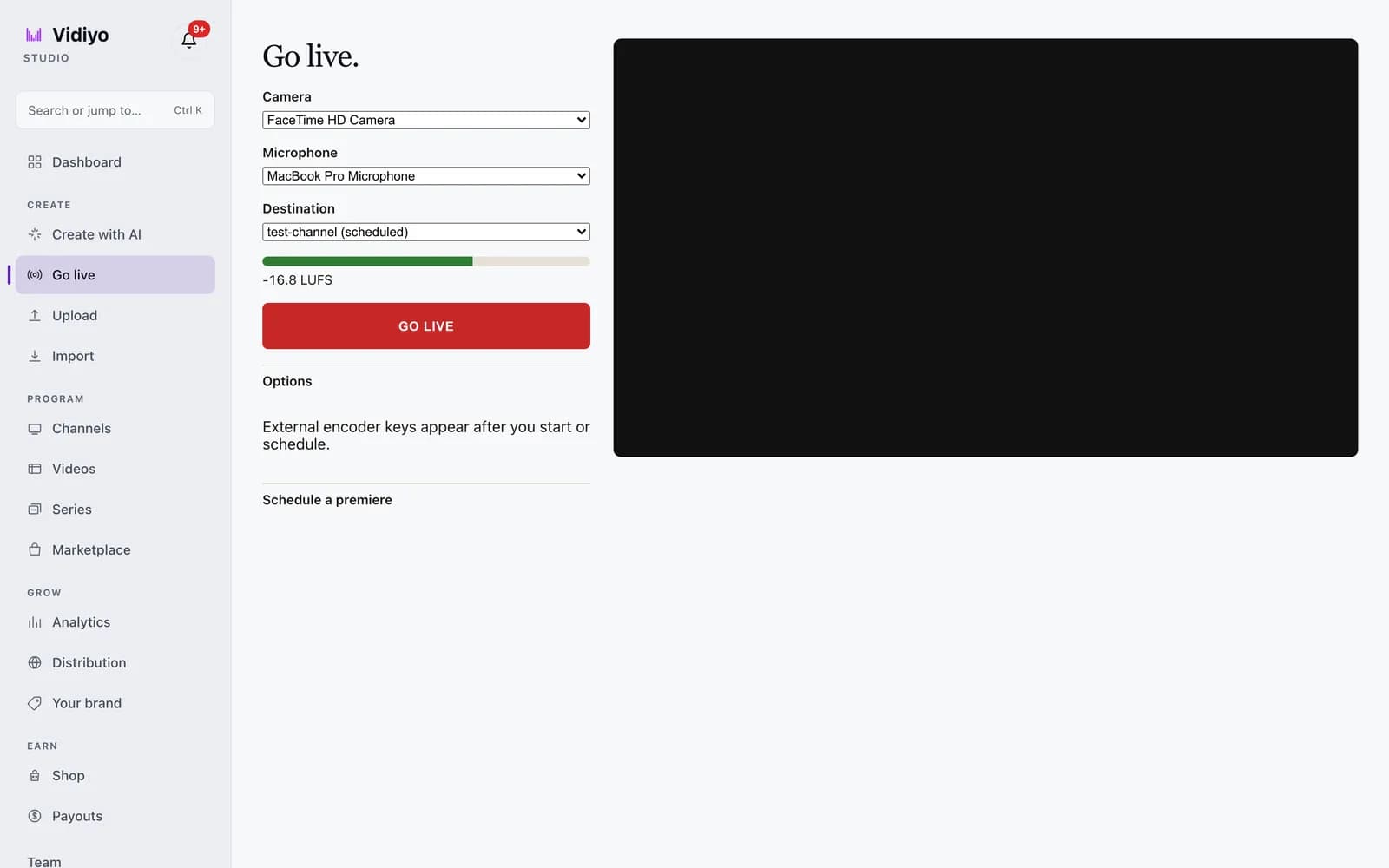
Open Go live in studio or the app. Preview the camera first, pick the
destination (CH {number}), watch the loudness meter (LUFS on web, peak dBFS
on phone), then GO LIVE.
- Now, no schedule: viewers watch
/live/:id. Your 24/7 channel keeps looping VOD. - Scheduled on a 24/7 channel: that slot takes over the channel for the window. If the encoder is idle, viewers see slate until you connect or the slot ends.
- Someone else's channel: only if they scheduled the slot and invited you. You publish. You do not create the schedule.
OBS keys stay under External encoder.
Before your first live on the channel
- Channel name, art, and about blurb published
- EPG entry for the live block created in advance
- Encoder and backup path tested
- Chat moderation ready
- Music and on-screen rights cleared for linear
- Recording destination confirmed
- Promo posts scheduled with clock and platform
- Fallback slide designed
If you are launching from near-zero library, read launch with no library and how to start a FAST channel.
Running the live block like a station
Pre-roll (5 to 10 minutes before)
Branded slate with start time. Soft music you cleared. Chat opens if your stack allows.
Open
Identity, agenda, runtime, and replay plan in under a minute.
Body
Segmented rundown with planned stretch or ad breaks. Tell the room when a break is coming.
Close
Next live time, where replays land, thank guests, bumper out.
Post
Stop the encoder cleanly. Verify the recording. Do not leave a frozen last frame on the linear output if your architecture risks it. Hand control back to the playlist or next scheduled asset.
Turning tonight into tomorrow's grid
Within 24 hours when you can:
- Trim technical faults
- Add captions
- Write the EPG episode title
- Schedule at least one primetime replay and one overnight window
- Cut two vertical promos for feed pointing at the next live
Repurpose for feed, live, and TV is the cutting room companion. AI can speed captions; keep QC human. AI video for FAST channels applies.
Building toward true 24/7
Week 1: One live, heavy replays, short safety loop
Week 2: Add a midweek desk or second short live
Week 3: Introduce evergreen catalog blocks so replays are not identical every hour
Week 4: Tune dayparts using hold and return metrics from audience and growth guides
Honesty beats fake variety. If overnight is a three-episode loop, the EPG can still be accurate and useful.
Ops roles (even if one person wears all hats)
- Producer / host: show content
- Director / switcher: scenes and failsafes
- Chat mod: room temperature
- Librarian: scheduling and metadata
- QC: captions, audio, rights
Solo creators should timebox the librarian and QC hats the morning after each live. Skipping them is how 24/7 becomes 24/7 of known problems.
Ad breaks and monetization while live
SSAI may insert pods around your live or VOD replay windows depending on platform behavior. Design segments with recovery points. Do not stack host reads on top of dense ad loads without a plan. Money context: FAST channel monetization, what is SSAI, and the revenue calculator.
Sponsorships work best on flagships with predictable audiences. Sell the clock you can deliver.
Incident playbook
Guest no-show: run the backup segment or solo desk topic already outlined.
Internet drop: swap to safety loop; post status on social; resume if time remains.
Rights mistake on screen: cut the bit from replays; document; update checklist.
Chat raid: slow mode, mods, temporary follow-only if needed; do not debate raiders on the big screen.
Wrong EPG: fix immediately; say the correction on air if the live is still up.
Common failure modes
- Daily live with no replay pipeline (no catalog growth)
- 24/7 unique content promises you cannot keep
- Live music that cannot legally hit the linear output
- No safety loop
- Promoting a time and then slipping weekly without notice
Discipline is the product.
Staffing models that scale with you
Solo: Live weekly, edit next morning, schedule three replay windows, keep a two-hour safety loop. Protect one admin hour for EPG and art.
Duo: Host plus chat/mod/switcher. Split librarian duties so metadata does not wait a week.
Small team: Add a dedicated scheduler and a QC pass before any new master enters primetime. Use a shared rundown doc.
Write who covers vacation. Channels die when only one person knows how to take the stream out of a failed live.
Holiday and special-event ops
Specials are good for growth and bad for sleep if unplanned. Two weeks ahead: lock topic, guests, rights, promo creative, and replay plan. Build a shorter backup show if the event can overrun. Update the EPG as soon as times firm up. Tell your owned audience once when the time is tentative and once when it is final.
After the special, do not leave the grid empty. Drop into normal replays with a bumper thanking viewers and pointing at the next regular flagship.
What this looks like in Vidiyo Studio
The Go live page is one screen: pick a camera and microphone, pick a destination channel, watch the loudness meter, and press the button. External encoder keys for OBS or a hardware encoder appear after you start or schedule, so a phone stream and an RTMP stream use the same page.
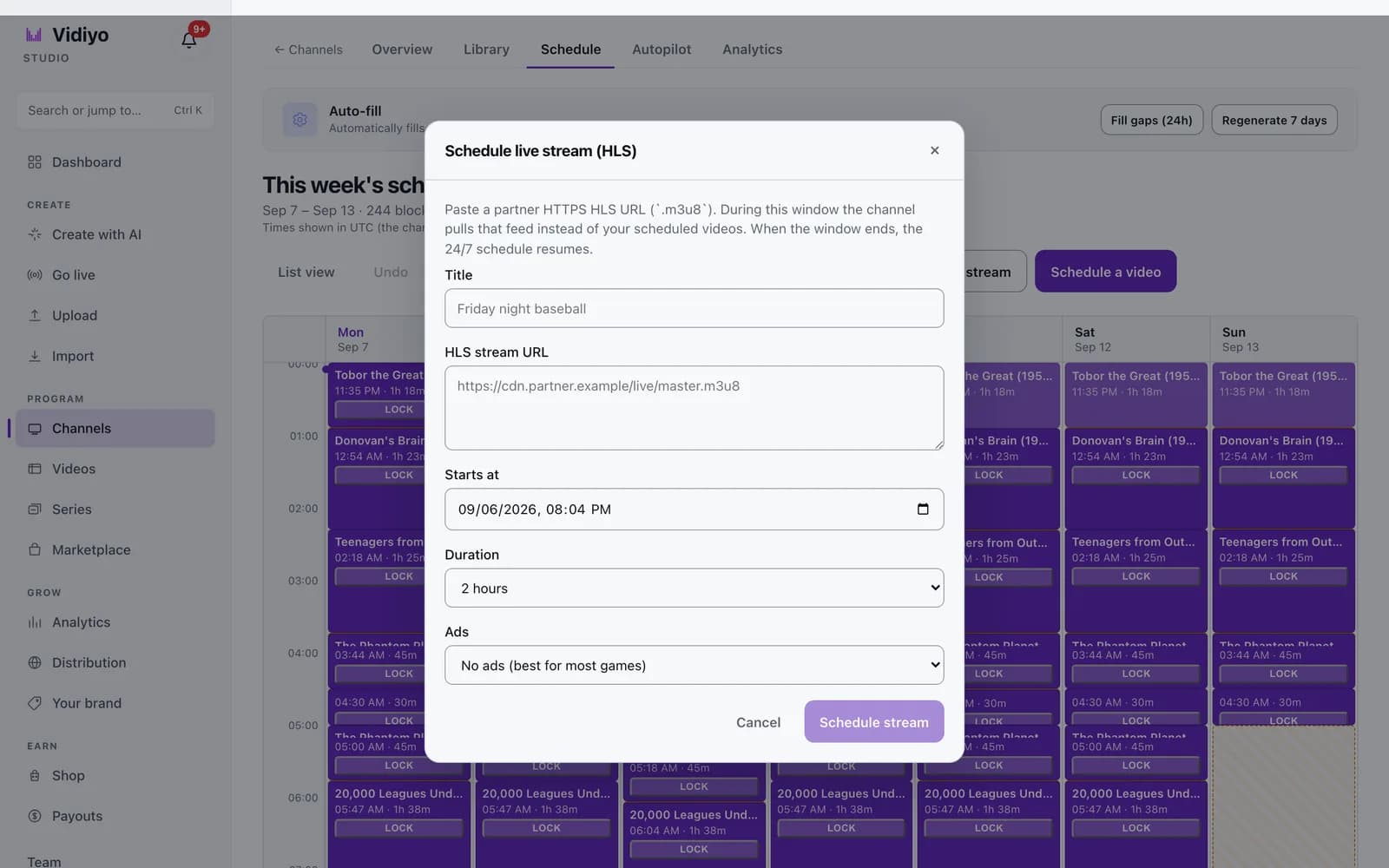
A live event that comes from a partner feed goes onto the channel grid instead. The Schedule live stream dialog takes an HTTPS HLS URL, a start time, a duration, and an ad setting. For that window the channel pulls the feed in place of the scheduled videos, and when the window ends the 24/7 schedule resumes on its own. That is the "safety package" above, built into the grid.
The step-by-step versions are Go live and Schedule a live stream.
Monitoring while you are away
You cannot stare at the stream all night. Set alerts your platform supports for offline signals. Check the overnight loop after big changes. Keep a phone-accessible way to switch to the safety package. Document the steps in five lines so a friend can help in an emergency.
Audience trust depends on the stream being there more than on any single clever episode.
Connecting live ops to growth
Every live should feed audience and growth loops: clear clock, clip promo, return rate check. Ops for its own sake is maintenance. Ops tied to habit is how 24/7 becomes a business, not a treadmill.
Quick answers
Do I need to be live 24/7? No. You need a 24/7 stream. Live can be a few high-quality blocks per week.
How soon should replays air? Same day or next day for flagships, then rotate through the week.
What if I have almost no catalog? Start live-first with a safety loop and grow the library from recordings. See launch with no library.
Can I simulcast to YouTube? Often yes if rights allow. Keep CTAs appropriate per surface. See FAST vs YouTube.
Cite this page
Vidiyo, "How to Go Live and Run a 24/7 Channel", vidiyo.com/learn/how-to-go-live-and-run-a-channel.
Operator takeaway
Treat this page as a working checklist, not a one-time read. Revisit it when you change schedule density, ad load, distribution targets, or source quality. Small weekly improvements compound faster than a single big relaunch. If you need a free place to run the channel while you learn, start creating on Vidiyo.
What's next
Ready to launch your TV channel?
Vidiyo handles streaming, ads in the stream, the TV guide, and apps on every screen so you can focus on programming.