 Vidiyo
How to Start a FAST Channel
How to start a FAST channel: pick a free platform, clear rights, upload content, schedule 24/7, and go live on Roku, Fire TV, Apple TV, and the web.

Short answer: Clear linear rights, pick a platform, upload, schedule 24/7, and publish. Free self-serve is enough for most first channels. You do not need your own Roku or Fire TV app on day one.

FAST means Free Ad-Supported Streaming TV. It is a scheduled linear channel that plays around the clock. Viewers watch free; ads fund the channel.
If you already have video, a FAST channel is a high-impact way to reach TV without building an app. Compare free economics in free FAST channel platforms. Estimate earnings with the FAST revenue calculator. Coming from YouTube? Read converting a YouTube library to a linear channel.
Quick answers
Do I need to build my own Roku or Fire TV app? No. On a managed platform like Vidiyo, your channel lives inside the existing app footprint on Roku, Fire TV, Apple TV, iOS, and Android.
How much content do I need to launch? Usually 4-12 hours that loop cleanly. A stronger 24/7 wheel often wants 24-72 hours of unique material.
What rights do I need? Linear FAST rights. On-demand-only licenses are not enough. Confirm broadcast or FAST rights in writing.
Is free self-serve enough for a first channel? Yes for most first channels. Pick a platform, upload, schedule 24/7, and publish.
What makes FAST different from YouTube
FAST channels are linear: a fixed schedule viewers tune into, like broadcast TV. YouTube is on-demand: viewers pick each title.
That difference drives:
- No algorithm gate for the next minute. Viewers watch what is on when they tune in.
- Longer lean-back sessions. Linear viewing often means less skip behavior than on-demand feeds.
- Stronger channel CPMs. FAST inventory often clears in the $10-$40+ CPM range, higher than many YouTube rates, because buyers can buy a channel placement.
- TV guide distribution. FAST channels show up in free tiers on Roku, Fire TV, and smart TV apps alongside Pluto TV and Tubi.
Market size and share numbers live in FAST industry statistics.
Do you need to build an app?
No. That is the most common misconception.

On a platform like Vidiyo, your channel lives inside the Vidiyo app, already on Roku, Fire TV, Apple TV, iOS, and Android. You get multi-platform distribution without writing app code.
A branded channel app on Roku or Fire TV is a later, separate process with each store. Most operators start inside an aggregator app, then pursue branded apps after they have audience.
What infrastructure does a FAST channel need?
HLS playout
Your channel must generate a live HLS manifest from the schedule in real time. That is the core of FAST: a live stream assembled from scheduled assets, not a VOD file.
Managed platforms handle this. DIY means a playout engine that reads a schedule, fetches segments, and builds the manifest.
Electronic Program Guide (EPG)
The guide shows what is on now and next. TV platforms expect XMLTV (or equivalent). Your platform should publish it for you.
Server-Side Ad Insertion (SSAI)
Ads are stitched into the stream on the server, not by a client SDK. That keeps playback continuous and works with most TV platforms. Your platform stitches; you supply a VAST/VMAP ad tag when you bring your own demand.
CDN
Manifests and segments need a CDN. Managed platforms usually include delivery.
What content do you need?
You need video with rights to broadcast linearly. Typical sources:
- Original content you produced
- Licensed content with linear FAST rights
- Public domain works (US works published before 1931 are public domain as of 2026, plus US government works)
- Distribution agreements that explicitly cover FAST or linear streaming
Minimum viable channel: usually 4-12 hours that loop cleanly. A stronger 24/7 wheel often wants 24-72 hours of unique material.
Formats most platforms accept: MP4 (H.264/H.265), MOV. Target at least 1080p sources.
Content that usually fails FAST:
- Live sports without the right live rights
- Licenses limited to on-demand only
- Music licenses that exclude broadcast or linear streaming
Choosing a FAST platform
Enterprise (Amagi, Wurl, Frequency): Built for media companies. Often quote-based or mid-to-high monthly fees, sales process required. See the tier map in best FAST channel platforms 2026.
Mid-market (Zype and peers): Subscription pricing, often hundreds to a few thousand dollars per month.
Self-serve (Vidiyo): Free to launch, monetization via ad revenue share. Built for independents, podcasters, leagues, and anyone who wants to go live without a contract. Free-tier detail: free FAST channel platforms.
If you are reading this guide, Vidiyo is usually the right first stop: launch, test, and grow without buying infrastructure you have not proven yet.
Step-by-step: launch on Vidiyo
- Create your account at vidiyo.com/sign-up. Free.
- Upload content. Drop MP4s into the library. Vidiyo transcodes the adaptive ladder for each platform.
- Build the schedule. Use the week grid. Use auto-scheduler to fill gaps.
- Configure the channel. Name, description, logo, category. These power discovery.
- Publish. Your channel goes live on the web at
vidiyo.com/watch/your-slugand inside the Vidiyo apps. - Review ad settings. SSAI runs automatically. Tune break cadence in the dashboard.
YouTubers can also start from /for/youtubers. Coming from an existing catalog? Convert YouTube to linear.
What it takes on Vidiyo
We run this product. The first channel does not need a sales cycle, a branded Roku app, or an Amagi quote. Create the account. Upload MP4s. We transcode the ladder. Build the week grid. Auto-fill the gaps. Publish. The channel is live on the web at vidiyo.com/watch/your-slug and inside the Vidiyo apps on Roku, Fire TV, Apple TV, iOS, and Android. SSAI runs. You tune break cadence in the dashboard.
What you do not get on day one: your own Samsung TV Plus, LG Channels, or Vizio WatchFree+ deal. The channel lives in the Vidiyo app footprint. That is enough to learn whether the schedule and the library work. Buy OEM doors when monthly hours and revenue can pay for them. Until then the work is rights, schedule density, and retention.
What the launch looks like in Studio
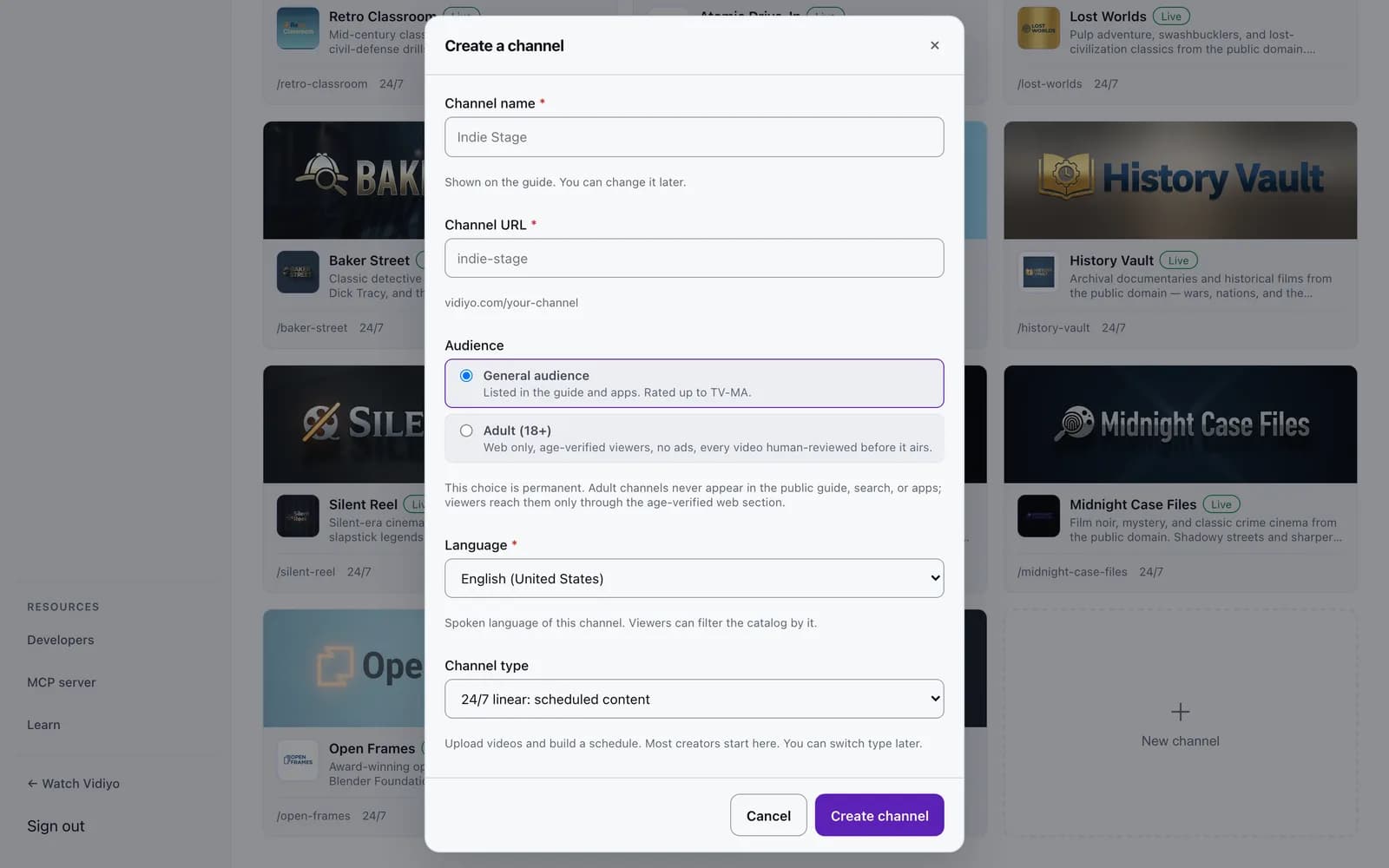
Two screens carry the whole launch. The first is the Create a channel form: a name, the channel URL, the audience (general or adult), the spoken language, and the channel type. The audience choice is permanent, so it is the one field to get right on day one. Everything else can change later.
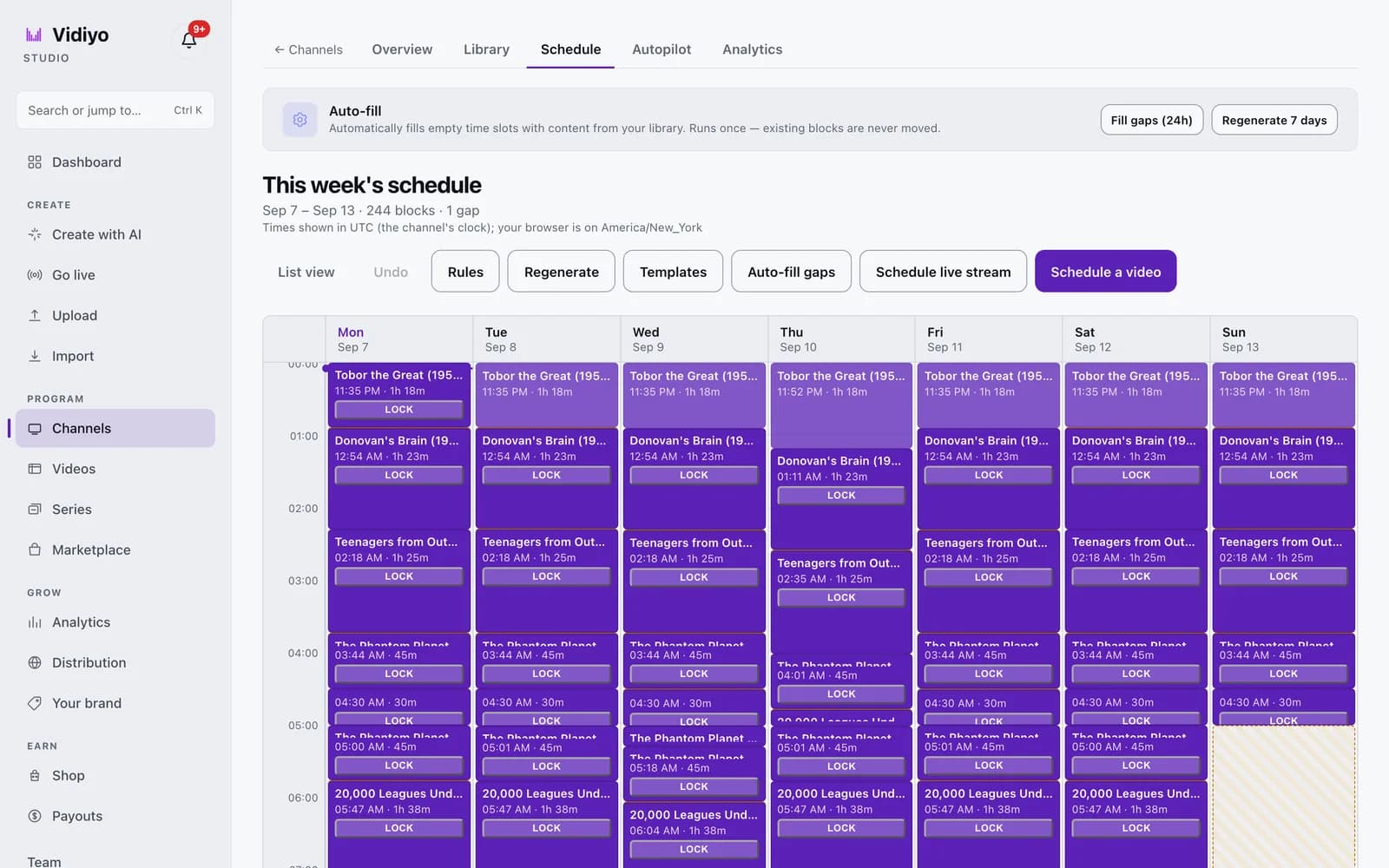
The second is the week grid. Every block on it is a video at a time, in the channel's clock; the channel plays whatever the grid says, 24 hours a day. Schedule a video into a slot, or use Auto-fill gaps to cover the empty hours. The header counts blocks and gaps for the week, so a hole in the overnight is visible before a viewer finds it.
The clicks live in two tutorials: Create a channel and Schedule your week.
Spanish: cómo crear un canal FAST.
What to expect after launch
- Distribution: Live on web, mobile, and Vidiyo TV apps when you publish. No approval queue for the Vidiyo path.
- Indexing: Expect 2-4 weeks before search and EPG surfaces catch up on some devices.
- Viewers: Organic discovery is slow at first. Share the link. Promote socially. In-app browse helps later.
- Revenue: CPM-based. Small audiences earn small amounts. Revenue scales with hours watched. Sanity-check with the FAST revenue calculator.
Common mistakes to avoid
Uploading content without linear rights. FAST is not YouTube Content ID. Confirm broadcast or FAST rights in writing.
Launching with under 4 hours. Hourly loops frustrate viewers and hurt repeat tuning.
Ignoring the EPG. The schedule is the product. Clear titles and accurate metadata improve discovery.
Waiting for a perfect library. You do not need 200 hours. Eight solid hours with an active schedule beats a perfect library still on a hard drive.
Operator takeaway
Treat this page as a working checklist, not a one-time read. Revisit it when you change schedule density, ad load, distribution targets, or source quality. Small weekly improvements compound faster than a single big relaunch. If you need a free place to run the channel while you learn, start creating on Vidiyo.
Document what you changed and when. Future you will need that history when fill, retention, or guide metadata drifts.
Common first-month traps
New operators usually fail on three things: uploading low-bitrate masters, scheduling sparse loops with no dayparting, and turning on dense ad pods before retention exists. Fix source quality first. Then fill the week grid until every hour has a deliberate show. Only then raise ad load. Pair this guide with how to grow a FAST channel once the stream is stable.
What's next
- Free FAST channel platforms: no monthly fee options
- Best FAST channel platforms 2026: tier map
- How to grow a FAST channel: retention and discovery
- Converting YouTube to a linear channel
- Vidiyo for YouTubers
- FAST revenue calculator
- How to schedule a 24/7 FAST channel
- What is SSAI
- How to monetize a FAST channel
- How much do FAST channels make
- FAST industry statistics
- En Español: cómo crear un canal FAST
Ready to launch your TV channel?
Vidiyo handles streaming, ads in the stream, the TV guide, and apps on every screen so you can focus on programming.