 Vidiyo
Launch a FAST Channel With No Library: Live, AI, Public Domain, and YouTube Paths
Launch a FAST channel with no library: live programming, AI-assisted production, public domain content, and YouTube conversion paths for operators.

You do not need a warehouse of finished episodes to launch a FAST channel. Operators start every week with live streams, small original batches, public domain catalogs, and libraries converted from existing YouTube channels. The constraint is rights, not volume on day one. A channel that goes live with two hours of clean content and a honest schedule beats a channel that never launches because the library is not "big enough yet."
This guide maps four practical paths when you are starting from zero or close to it. For the full launch playbook, pair it with how to start a FAST channel.
Can you launch with live programming only?
Yes, and many successful channels do. Live fills airtime with programming you already make: talk shows, gameplay, news commentary, worship services, sports talk, or event coverage.
What live-first requires:
- A repeatable show cadence. Weekly or daily beats random "going live when I feel like it."
- Rights you own. You must control what appears on camera, including music, guest content, and screen shares.
- A fallback loop. Live cannot cover 24/7 on day one. Record each live session and replay it between broadcasts until the catalog grows.
Vidiyo supports live streams with chat and can slot recorded live sessions into a linear schedule. You are building a TV station schedule, not a one-off stream.
Start with a realistic grid: one or two live blocks in primetime, replays overnight, and a short filler loop for gaps. Expand as recordings accumulate.
How can AI help without replacing judgment?
AI tools can accelerate production when you already know what the channel is. They do not replace rights clearance or editorial taste.
Useful applications:
- Metadata and EPG copy. Draft episode descriptions and guide entries from your outlines, then edit for accuracy.
- Rough cuts and B-roll assembly. Speed up editing on commentary channels where the value is the host, not cinematic polish.
- Thumbnail and promo variants. Test listing art faster across platforms.
- Translation and captions. Reach broader audiences when your source audio is clean.
Risky applications:
- Generating "new" episodes from copyrighted sources. If you do not own the underlying work, AI does not magically clear it.
- Voice cloning without consent. Platform partners and viewers both reject it.
- Fully automated schedules with no human review. Errors scale just as fast as output.
Treat AI as a production assistant on work you already have the rights to ship. Legal review still applies. Our content requirements guide lists what platforms expect in file quality and metadata regardless of how the video was made.
The Vidiyo version: Autopilot
Autopilot is the no-library path built into a Vidiyo channel. You write one brief: what each video should cover, an optional tone, an optional source page or feed to read for stories. Then you set a cadence (how often it runs and at what UTC hour), how many videos per run, a video length, and a Create Credit cap per run. Runs that would cost more than the cap are skipped. Publishing can be automatic, or every clip can wait for your approval. Each run is logged, which is the "human review" step from the list above made into a setting instead of a promise.
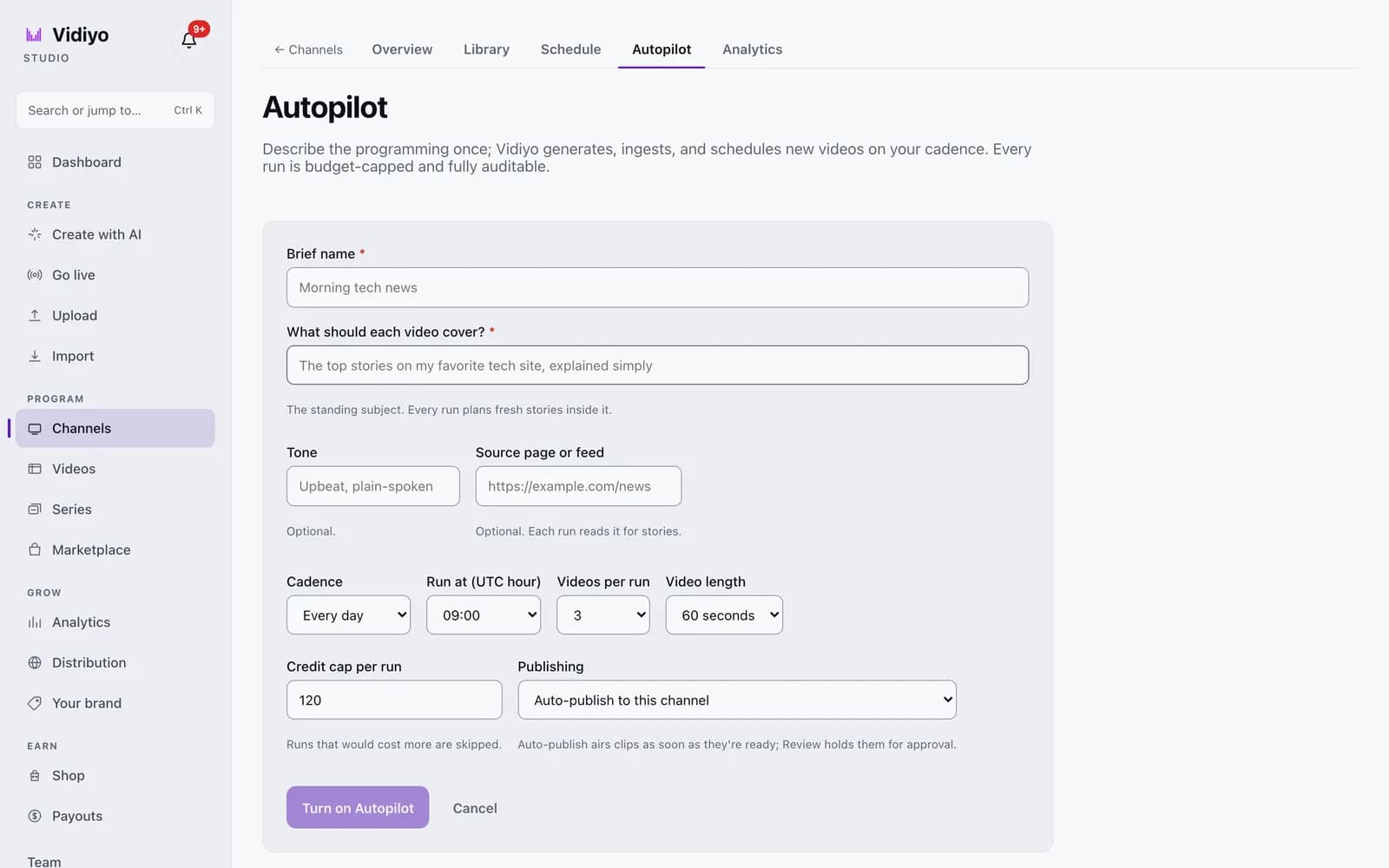
Setup is in Start an AI channel.
What can public domain content contribute?
Public domain content can fill hours at zero licensing cost when verified carefully. In the US, works published in 1930 or earlier are generally clear, plus US federal government works and carefully documented pre-1964 non-renewals.
Public domain is not "free old stuff from the internet." Verification is the job:
- Confirm the exact version you hold, not just the title.
- Trace music, foreign origin, and restoration layers separately.
- Document the search before scheduling.
The quality bar matters on TV. A scratchy dupe next to polished channels in the guide loses viewers fast. Budget time for cleanup: stabilization, audio leveling, and consistent transcoding. A public domain film channel competes on presentation, not on access alone, since everyone can reach the same underlying titles.
Use public domain as filler and genre texture, not as the entire brand, unless you commit to restoration as your product.
Can you convert a YouTube library into a FAST channel?
Often yes, if you own the YouTube catalog and your agreements allow linear broadcast. Many creators hold full rights to videos they uploaded themselves. The YouTube to linear channel guide walks through the conversion workflow.
The checklist before you schedule anything:
- Confirm linear rights. YouTube's upload terms are not identical to FAST distribution terms. Read your platform agreement and any music licenses attached to each video.
- Fix aspect ratio and loudness. Phone vertical clips may need padding or reframing for TV guides. Audio should meet broadcast-ish targets.
- Strip platform burn-in when required. Some partners reject obvious watermarks from other platforms.
- Reorder for TV pacing. A playlist sorted by upload date is rarely a good broadcast schedule.
Conversion works best when YouTube was already your production hub. You are repackaging a library you control, not scraping someone else's channel.
What does a minimum viable launch look like?
A credible day-one FAST channel needs:
| Element | Minimum viable | Better |
|---|---|---|
| Unique content | 2 to 4 hours that loops cleanly | 8 to 12 hours before heavy repetition shows |
| Schedule | Fixed grid with named blocks | Daypart programming with primetime anchors |
| Break policy | Light ad load, schedule-driven pods | Tested SCTE markers and SSAI fill |
| Listing assets | Clear title, category, art that reads on a TV grid | A/B tested thumbnails per platform |
| Legal file | Rights notes per title, even if PD | Full diligence trail per acquisition |
You do not need Roku certification on hour one if your platform already distributes through an aggregator app. You do need a stream that stays up, an EPG that matches what plays, and content you can defend if asked.
Vidiyo is built for this path: upload, schedule, go live on web and TV apps without an enterprise contract. Prove the format, grow the library, then pursue wider distribution partnerships when the numbers support it.
Quick answers
How many hours of content do I need to launch? Two to four hours of rights-clear content can loop on day one if the schedule is honest about repetition. Aim for eight or more hours before pitching major platforms. See how many hours of content for a FAST channel for planning detail.
Is public domain content enough for a whole channel? Legally it can be, commercially it rarely is. PD-only channels struggle unless restoration and curation are the product. Mix PD filler with live or original tent poles.
Can I use other people's YouTube videos? Not without their rights. Conversion applies to libraries you own or have licensed for linear use.
Do I need my own Roku app? No. Aggregator apps like Vidiyo distribute your channel on Roku, Fire TV, and Apple TV without custom app development.
What's next
- Vidiyo for AI creators and Vidiyo for live streamers: product pitches for AI-first and live-first launches
- AI video for FAST channels: create, label, program
- How to start a FAST channel
- Converting a YouTube library to a linear channel
- Public domain content for FAST channels
- FAST channel launch checklist
- FAST channel costs: what to budget
Ready to launch your TV channel?
Vidiyo handles streaming, ads in the stream, the TV guide, and apps on every screen so you can focus on programming.