 Vidiyo
Invite your team
Invite people to your Vidiyo Studio by email, pick the Admin, Editor, or Viewer role for each one, create a separate team, and remove or revoke access.
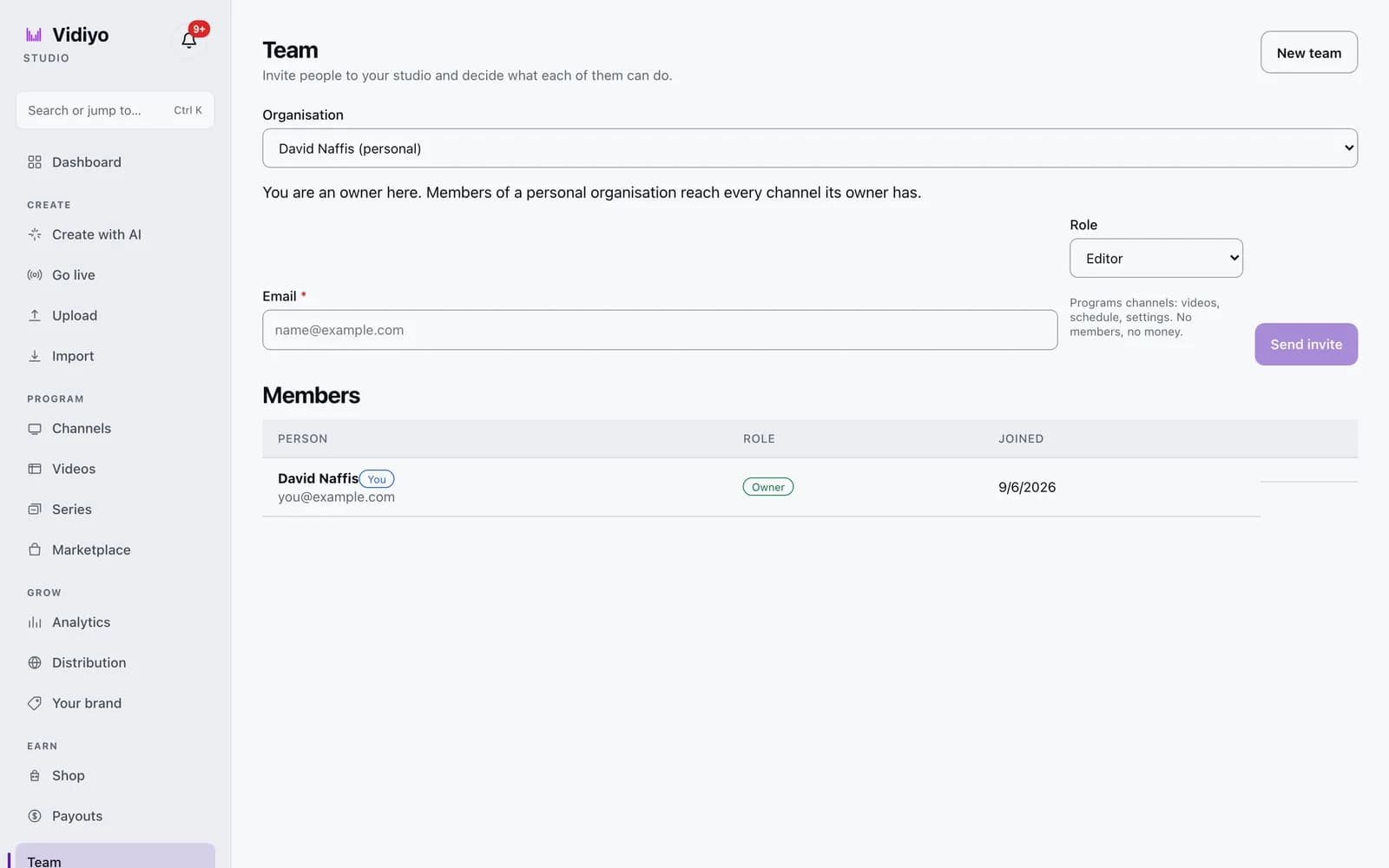
The Team page lets other people work in your Studio without sharing your password. You invite them by email, give each person a role, and they sign in with their own Vidiyo account. Roles decide what a person can change, from programming channels to seeing payouts.
Use it when an editor programs your schedule, a partner needs to read analytics, or a manager should handle members and money.
Before you start
- Everyone you invite needs their own Vidiyo account, created with the email address you invite.
- Only an Owner or Admin can send invites, change roles, or remove members. Editors and Viewers see the member list only.
Steps
1. Open Team
In the Studio sidebar, scroll to the bottom and click Team. The Organisation dropdown shows your personal organisation, named after you with "(personal)" after it. Below it a note tells you your role and what members reach. In a personal organisation, members reach every channel you own.
2. Pick a role
The Role dropdown defaults to Editor. A hint under it describes each choice:
- Admin: programs channels, publishes, manages members, sees payouts.
- Editor: programs channels: videos, schedule, settings. No members, no money.
- Viewer: looks at channels and analytics. Changes nothing.
You can hand out a role up to your own. Nobody can be made Owner; that role stays with the person who created the organisation.
3. Send the invite
Type the person's address in Email and click Send invite. Studio emails them a link and lists them under Pending invites for 7 days. If the email fails to send, a warning toast says so and the page prints the invite link below the form. Copy that link and send it yourself.
If the address already belongs to a member, or already has a pending invite, the form shows an error under the Email field.
4. The invitee accepts
The person opens the link while signed in to Vidiyo with the invited email. Studio joins them and shows You joined [team name] with an Open channels button. If they are signed in as a different account, the page tells them to sign in with the invited email and open the link again. Expired links show This invite has expired. Ask for a new one.
5. Change a role or remove someone
In the Members table, each row shows the person, a Role dropdown, and their Joined date. Owners and Admins change a role from the dropdown; the change saves at once and a toast confirms it. Click Remove at the end of a row to take someone out, then confirm in the dialog. To cancel an invite before it is accepted, click Revoke next to it under Pending invites.
You cannot change your own role, and no one can remove or demote the Owner. A member who is not the Owner can click Leave on their own row.
6. Create a separate team
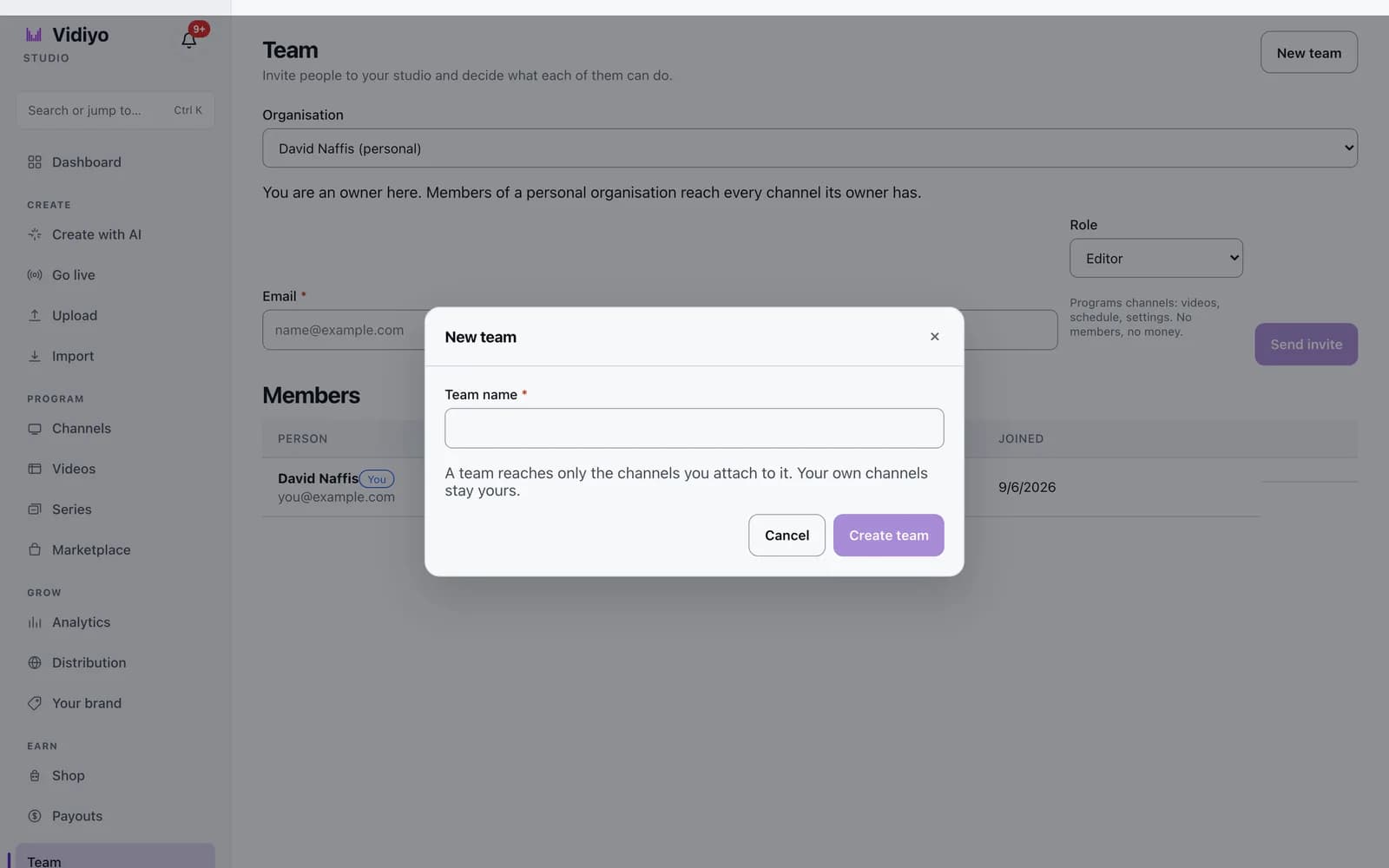
Click New team at the top right. Type a Team name (up to 120 characters) and click Create team. The new team appears in the Organisation dropdown and is selected. A team reaches only the channels attached to it. Your own channels stay yours. Invite people to a team the same way as in Step 3.
Tips
- Use your personal organisation when a helper should reach everything you own. Use a team when someone should reach a smaller set of channels.
- Admins see payouts but cannot connect the Stripe account or change payout settings. That stays with the Owner.
- Publishing a channel, reading a stream key, and deleting a channel need Admin or Owner. Editors can edit and schedule but not publish.
Quick answers
What can an Editor do in Vidiyo Studio?
An Editor can add and edit videos, build the schedule, and change channel settings on the channels they reach. They cannot publish a channel, invite or remove members, or see payouts.
How long does a Vidiyo team invite last?
7 days. After that the link shows "This invite has expired." An Owner or Admin can send a new invite to the same address.
Can I invite someone without a Vidiyo account?
You can send the invite, but they need an account to accept it. They should create one with the invited email address, sign in, and then open the link.
How do I give a team access to a channel?
Teams reach only the channels attached to them. Attaching a channel you own to a team is done through the Vidiyo API today. The Team page in Studio handles members and roles.
Can I transfer ownership of my organisation?
No. The Owner role stays with the person who created the organisation. Give a trusted person the Admin role instead; they can do everything except delete the organisation and manage payouts.
Open Studio
Upload a video, go live, or program your channel. Studio is free, and every guide here walks you through one task.